
Which is Right For Me? Jspreadsheet CE or Pro?
Here, we offer impartial insight into what each package includes. We cover what you get for free, when licensing comes into play, and how to make the right choice.
Published at 23/03/2026
Two Editions, One API Surface
Jspreadsheet is offered in two main packages. First, we have the "Community Edition" (CE), which runs under an MIT license (meaning it can be used commercially without paying extra or jumping through hoops).
Secondly, there is the "Pro package" which gives you more features like formulas, XLSX import/export, real-time collaboration, and AI. This one requires a commercial license to deploy.
Despite the disparity in features between the two editions, they're both basically built on the same API. That means the data binding, columns, style, and events all work the same way, so anything you've created on CE can move to Pro without a rewrite being needed.
So, what you're really comparing is what's available straight out of the box and what you'll need to build, maintain, and own by yourself.
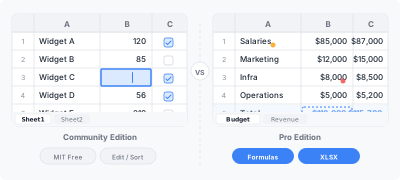
Feature Comparison
Here's what you get in each edition. No asterisks, no surprises.
| Feature | CE (Free, MIT) | Pro (Enterprise) | Pro (Ultimate) |
|---|---|---|---|
| Editable cells | Yes | Yes | Yes |
| Column types (text, number, dropdown, date, checkbox, color) | Yes | Yes | Yes |
| Copy and paste (including from Excel) | Yes | Yes | Yes |
| Sorting and filtering | Yes | Yes | Yes |
| Row and column operations (insert, delete, move) | Yes | Yes | Yes |
| Undo/redo | Yes | Yes | Yes |
| Keyboard navigation | Yes | Yes | Yes |
| Context menus | Yes | Yes | Yes |
| Multiple worksheets | Yes | Yes | Yes |
| Custom cell editors | Yes | Yes | Yes |
| Events and callbacks | Yes | Yes | Yes |
| Toolbar | Yes | Yes | Yes |
| Formula engine (500+ functions) | No | Yes | Yes |
| XLSX import | No | Yes | Yes |
| XLSX export | No | Yes | Yes |
| Cross-sheet formula references | No | Yes | Yes |
| Virtual rendering (100K+ rows) | No | Yes | Yes |
| Advanced data validation | No | Yes | Yes |
| Charts extension | No | Yes | Yes |
| Search extension | No | Yes | Yes |
| Row grouping | No | Yes | Yes |
| Cell comments | No | Yes | Yes |
| Merged cells (header spans) | Limited | Full | Full |
| Real-time collaboration (Server) | No | No | Yes |
| AI integration | No | No | Yes |
| Audit trail | No | No | Yes |
| Persistence (Server) | No | No | Yes |
| Technical support | Community (GitHub) | Included | Priority |
When CE Is Enough
The CE package does a good job of handling the core data grid, and most of the time, that's all you're going to need.
Should you choose to build internal tools, such as simple dashboards or admin panels (where users edit rows, switch drop-downs, and save changes), CE already has it covered. You also get to enjoy features like inline editing, typed columns, and copy-paste, as well as everything required to keep everything in sync with your back-end.
It's also a good fit for early-stage work, such as MVPs and prototyping. Basically, any time you need something up and running quickly, just install jspreadsheet-ce, bind your data, and you're good to go. If things outgrow this setup, you can deal with that later.
Licensing is another easy win here, as CE is MIT, meaning that if you're collaborating on open-source projects (even those where you want to side-step the licensing overhead), you can use it to your heart's content with zero restrictions.
It does a good, straightforward job of data entry, too. All the basics (drop-downs, check-boxes, date pickers, validation, etc) are there, and they behave exactly how you'd expect them to.
Where CE Starts to Fall Short
The limitations of the CE package aren't immediately apparent, but when they show themselves, they can quickly become a problem.
The first big one is formulas. The issue is that the CE package doesn't have a formula engine, so the moment you expect things like =SUM(B2:B50) or =VLOOKUP(...), you end up hitting a wall. Sure, you can try to build something yourself, but the reality is that's going to be a long and complex job. The Pro package is the answer, as it offers hundreds of Excel-compatible functions.
Another common problem is how CE handles Excel files. If you need to upload .xlsx files, edit them, and download them again without breaking the formatting or formulas you've created, CE is going to hold you back. You can wire up something like TabularJS, but you can quickly find yourself with a patchwork of extra code. The Pro package has no such limitation.
Performance can become an issue as your data grows with CE, as it renders everything into the DOM. This might work fine for small amounts of data, but for larger datasets you need the virtual rendering that Pro provides. That means only visible rows are processed, keeping things much smoother at high volumes.
There are also other smaller issues with CE that might require you to upgrade to Pro. Things like referencing data across sheets (=SUM(Revenue!B1:B100)) aren't supported in CE, because each sheet is isolated. Also, if you need real-time collaboration or multiple users editing at once, you're not going to get that on the lower package.
Then there are newer features like AI functions, where users can call something like =AI("summarize this data") directly from a cell. This can be really useful in some workflows, but again, it's not something the CE package offers.
Finally, you might notice the need to go Pro when you're in need of support. With CE, you're pretty much relying on community responses and GitHub issues. It may be workable some of the time, but once you hit a problem, it becomes untenable. The Pro package, however, gives you direct access to developers, as well as affording you priority support.
Installation
While the package editions have different names, they both install via npm:
npx @jspreadsheet/install
Both editions install through the same command. Pro is free for localhost and doesn't require a license during development, so you can start building and testing right away. A license key is only needed when you deploy to production.
Migrating from CE to Pro
Due to both editions sharing a core API, migration is nice and easy:
- Replace
jspreadsheet-cewithjspreadsheetin your package.json - Add your license key with
jspreadsheet.setLicense() - Install any extensions you need (formula-pro, xlsx, etc.)
- Your existing column definitions, data bindings, and event handlers carry over unchanged
In most cases, migrations like these (for a single component) take less than an hour. That scales with the number of Jspreadsheet instances in your app, not with how complicated each one is.
Licensing at a Glance
| CE | Enterprise | Ultimate | |
|---|---|---|---|
| License type | MIT (perpetual, free) | Commercial (subscription or perpetual) | Commercial (subscription or perpetual) |
| Commercial use | Yes | Yes | Yes |
| Team size | Unlimited | Up to 5 developers | Up to 10 developers |
| Applications | Unlimited | 1 application | 1 application |
| Source code access | Full (GitHub) | Obfuscated | Obfuscated |
| Support | GitHub Issues | Technical support | Priority support |
For teams with more than 10 members, contact sales for a Tailored plan.
How to Decide
Ask yourself these three questions:
- Do we need formulas? If you do, you should go Pro, because you can't just bolt on a formula engine after the event.
- Do we need to upload or download Excel files? If you do, again go Pro. Keeping your data intact during all uploads and downloads can be a real headache with 3rd-party libraries.
- Does our dataset go over a few thousand rows? You guessed it, go Pro! When you don't have virtual rendering, it can grind things to a halt fast.
If you said "No" to the three questions above, start with the CE package; you can always upgrade later if needed. On top of that, migration is easy and clean so you won't lose any code along the way.
Try Before You Commit
Pro gives you a free 30-day trial that gives you full access to every feature the package offers, so you can try out things like AI and collaboration before you commit to anything. There's no need for credit card information either. Just use the software to build your feature, test it, and then decide whether a commercial license is worth it... or not.