
Open Source JavaScript Spreadsheet - What to Look Out For & How to Get Started
How to choose the right library for your needs without running into problems like licensing, bundle size, and a lack of features.
Published at 25/03/2026
Why It's Important to Choose Open Source Spreadsheet Components
When you're furnishing a web app with spreadsheet functionality, it usually means a choice between building it yourself or adding a library. The thing is, building it from scratch usually takes months, and when you're using a commercial library, you soon realize you're looking at per-dev seats, annual renewals, and the hassle of license keys.
In open-source spreadsheet libraries, you get a third option to consider. They give you things like working cell editing, keyboard navigation, copy-paste functionality, and styling, all without having to start from scratch or go through the procurement process. The "catch" is that "open source" covers an array of feature sets, licenses, and maintenance levels, but not every GitHub project is "production-ready" and MIT badges don't always do what you think they do.
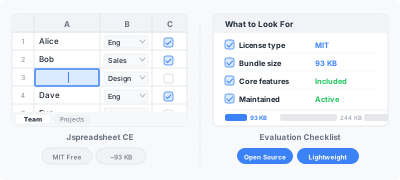
What to Think About Before Choosing a Library
The rating stars and download counts are good things for a library to have, but that doesn't mean they're guaranteed to be a good fit. Here are the things that actually matter when you're weighing up open-source spreadsheets for your project.
Type of License
This one catches a lot of people off guard. You'll find that some libraries use the MIT license, which you can use commercially anywhere, with no strings attached. However, others use AGPL or custom "open-core" licenses that limit what you can do with them commercially. Either that or they require you to open-source your own application.
That's why you should always read the LICENSE file, rather than the marketing page. If the library in question says "free", but it's got an AGPL license, your legal team is going to give you some questions to answer.
Bundle Size
The size of spreadsheet libraries can vary widely. For example, a 600+ KB gzipped dependency will severely slow down your app's load time. That means if your users are on mobiles or slower internet connections, the bundle size can have a huge effect on how smoothly things go.
Here's how the current options compare:
| Library | Gzipped Size | License |
|---|---|---|
| Jspreadsheet CE | ~122 KB | MIT |
| Handsontable | ~353 KB | Custom (requires commercial license for business use) |
| AG Grid Community | ~322 KB | MIT |
| Syncfusion Spreadsheet | ~925 KB | Commercial |
Core Feature Set
The majority of open-source libraries are equipped to handle basic tasks, including editable cells, sorting, column types, and copy-paste functionality. It's in the small details that they tend to vary the most, with aspects like undo/redo-depth, merged cells, and drop-down editors. It also matters how easy it is to handle events in your app.
You should make a list of what your application actually needs. A spreadsheet created for internal tools will naturally have different requirements than those of customer-facing SaaS apps.
Framework Support
If you've got an app that runs Angular, Vue, or React, you need to look out for whether the library you're considering has first-class wrappers or if you're going to have to write lots of glue code by yourself. Some libraries work universally with any framework, by design (they mount to a DIV, and you manage the lifecycle), whereas others include dedicated components for specific frameworks.
Neither approach is incorrect, but the choice you make will significantly affect how much setup work you'll have to do.
Maintenance & Community
Here, you need to look at the spreadsheet's commit history, in addition to its star ratings. For example, a library with 15k stars but zero commits in eight months is going to be a completely different proposition to one with half as many stars, but that gets weekly releases.
Other things to think about are how issues get handled. If you report a bug, is it acknowledged? Are PRs reviewed? If the person maintaining the spreadsheet goes AWOL, can you fork and maintain it yourself?
How the Open-Source Spreadsheet Landscape Looks in 2026
Do a little digging around in the JavaScript spreadsheet sphere, and you'll see several well-known names available to you. Here's an unbiased look at the open source avenues available to you this year.
Jspreadsheet CE
CE is a free, MIT-licensed spreadsheet which can cover all of your basic needs. It offers editable cells, a range of different column types (dropdowns, dates, text, etc.), copy-paste from Excel, filtering, sorting, and all the usual features you'd expect.
You also get support for multiple worksheets, as well as a custom editor and events. This lets you hook it into your app without causing too much friction, and it works in plain JavaScript or alongside frameworks like Vue or React.
Where it comes a little unstuck is when you're looking to carry out more advanced work. The omission of a formula engine, combined with the lack of a built-in Excel import/export function, can lead to poor performance when working with very large datasets. That said, they're features you will get with Pro.
Luckysheet/FortuneSheet
At one point, Luckysheet was a popular open-source option, but development dried up. From there, FortuneSheet took over as the active project, offering an experience similar to Google Sheets. That means you get formulas, conditional formatting, and charts, but it can make your app more cumbersome to work with.
AG Grid Community
AG Grid's community edition is licensed under the MIT license and focuses primarily on grid functionality, i.e., grouping, pagination, and filtering. It's good at handling tabular data, but it isn't a spreadsheet, so you get no formula engine or cell merging. Also, the model is row-oriented, rather than being cell-oriented.
Handsontable
Since 2019, Handsontable's license has changed, meaning that anyone using it for business would need a commercial license from that point onwards. There are old MIT-licensed versions in circulation, but they're no longer updated, so if you want a genuinely free option for commercial projects, it may be one to avoid.
Getting Started with Jspreadsheet CE
Want to start working in your browser on a spreadsheet quickly? Here's how it's done, and it only takes around five minutes to complete.
Install via NPM
npx @jspreadsheet/install
Basic Setup
<link rel="stylesheet" href="https://cdn.jsdelivr.net/npm/jspreadsheet-ce/dist/jspreadsheet.min.css" />
<script src="https://cdn.jsdelivr.net/npm/jspreadsheet-ce/dist/index.min.js"></script>

<div id="spreadsheet"></div>

<script>
jspreadsheet(document.getElementById('spreadsheet'), {
    worksheets: [{
        minDimensions: [6, 6],
        columns: [
            { type: 'text', title: 'Name', width: 150 },
            { type: 'dropdown', title: 'Department', width: 150,
              source: ['Engineering', 'Sales', 'Design', 'Marketing'] },
            { type: 'calendar', title: 'Start Date', width: 120 },
            { type: 'checkbox', title: 'Active', width: 80 },
        ],
        data: [
            ['Alice', 'Engineering', '2024-01-15', true],
            ['Bob', 'Sales', '2023-06-01', true],
            ['Carol', 'Design', '2024-03-10', false],
        ],
    }],
});
</script>
After setup, you should see a spreadsheet with typed columns, drop-down selections, a date picker, and some checkboxes. You can copy and paste data into it directly from Excel, as well as reorder rows/columns and undo changes.
Add the Event Hooks
The CE spreadsheet fires events for just about everything you can think of: cell changes, row inserts, column moves, and selections. Just hook into them on your spreadsheet, and you'll see all those important notifications coming through.
jspreadsheet(document.getElementById('spreadsheet'), {
    worksheets: [{
        minDimensions: [6, 6],
        columns: [
            { type: 'text', title: 'Name', width: 150 },
            { type: 'text', title: 'Email', width: 200 },
        ],
    }],
    onchange: function(worksheet, cell, x, y, value) {
        console.log('Cell changed:', x, y, value);
    },
    oninsertrow: function(worksheet) {
        console.log('Row inserted');
    },
});
Load the Data
Provide your data as rows and columns to populate your spreadsheet.
jspreadsheet(document.getElementById('spreadsheet'), {
    worksheets: [{
        columns: [
            { type: 'text', title: 'Product', width: 150 },
            { type: 'text', title: 'Category', width: 120 },
            { type: 'numeric', title: 'Price', width: 100, mask: '$ #,##0.00' },
            { type: 'numeric', title: 'Stock', width: 80 },
        ],
        data: [
            ['Widget A', 'Hardware', 29.99, 120],
            ['Widget B', 'Software', 49.99, 85],
            ['Widget C', 'Hardware', 15.00, 340],
            ['Widget D', 'Services', 99.00, 56],
        ],
    }],
});
When CE Will Be Enough (And When It Won't)
CE is more than able to handle things well:
- Internal tools where teams need to view and edit tabular data within the browser
- Form builders with structured data entry and dropdowns
- Admin panels that need a quick way to bulk-edit records
- Prototypes or MVPs where you want spreadsheet-style functionality without having to spend weeks of your time building it
- Side projects or open-source apps where a free MIT license makes things nice and simple
When Jspreadsheet Pro Is the Only Viable Option
The Pro edition is the only choice in a range of circumstances:
- Formulas - If you need to type "=SUM(A1:A10)" and get a result, you're going to need Pro's Formula Pro engine
- Excel file import/export - CE simply can't parse .xlsx files
- Large datasets - Pro gives you virtual rendering for more than 50k rows without any lag
- Collaboration - If you want real-time, multi-user editing as a function, you're only going to get the feature with Pro
- Advanced validation - Pro also gives you server-side and conditional validation rules
If you're looking for a complete overview of what we've talked about, our CE vs Pro comparison article breaks it down for you.
Frequently Asked Questions
Can I use Jspreadsheet CE in a commercial product?
Yes. CE is licensed under the MIT license, which means you can use it commercially without restriction. That means no license key, no per-seat fees, and no annual renewal.
How big is the bundle?
About 93 KB gzipped. That's roughly a third the size of Handsontable and a quarter the size of AG Grid's community package.
Does CE support React, Vue, and Angular?
CE is suitable for pretty much any framework, mainly because it mounts on a plain DOM element. That means you can wrap it in a React, Vue, or Angular component with minimal code involved. You can see how on the framework integration pages.
What's the difference between jspreadsheet-ce and jspreadsheet on NPM?
CE is the free community edition, whereas Jspreadsheet is the pro (commercial) version. They share the same core API, but with Pro, you get formulas, XLSX handling, virtual rendering, and more.
Is CE still actively maintained?
Yes, CE enjoys updates, just like the Pro edition. You can find the source code on GitHub, where you can track releases, file issues, and even contribute.
Wrapping Up
When you're trying to decide on the right open-source library, it basically comes down to three things; 1) Does the license it comes with let you use it for business?, 2) Does it give you the features you need TODAY?, and 3) is the project maintained well, meaning you won't be forking it on your own six months later?
Spreadsheet CE is a good fit for many projects. It's MIT-licensed, lightweight (coming in at just 93 KB), and gives you the main features most web apps require. And when you need to outgrow what CE offers, upgrading to Pro is very simple thanks to the shared API.
So, start with CE, build what you need, and upgrade to PRO if and when you need to. It's that simple.