
Introducing TabularJS
A small, MIT-licensed library that reads any spreadsheet file and returns clean JSON. It runs in modern browsers and Node.js, and ships with nothing in node_modules.
Published at 20/04/2026
Why we built it
Every week or two, someone on our support channels asks a variation of the same question: "What's the easiest way to let users upload an Excel file and display it in my app?" We'd always point to one of the existing XLSX parsers, but each recommendation felt off. Some carried heavy dependency trees. Some kept changing their commercial terms. Most only handled one or two formats, so teams ended up stacking three libraries to cover XLSX, CSV, and ODS.
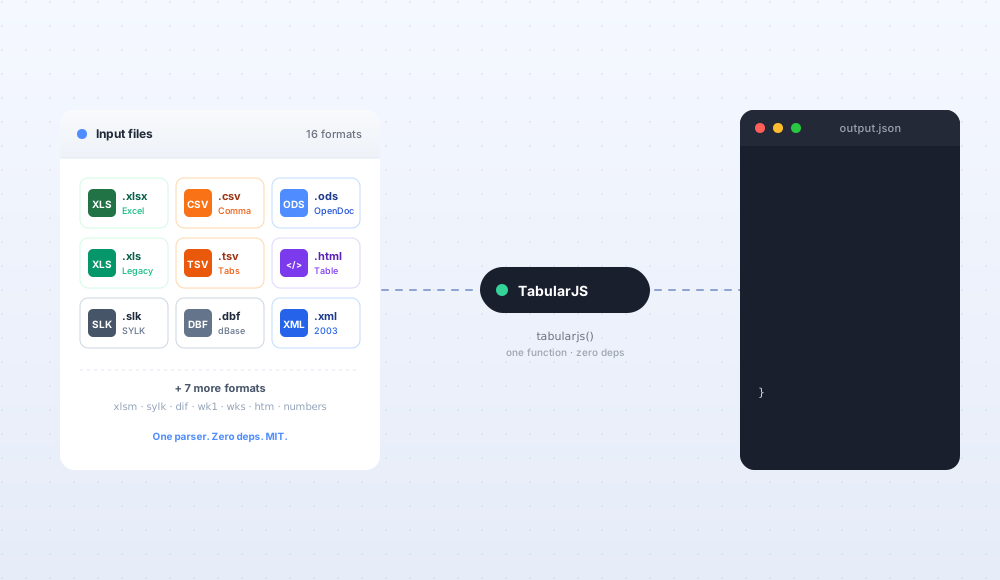
TabularJS is the library we wanted to recommend. One function, one output shape, one MIT license, sixteen formats.
What it does
You hand it a file. It hands you back JSON.
import tabularjs from 'tabularjs';

const { worksheets } = await tabularjs(file);
console.log(worksheets[0].data);
// [ ["Name", "Department", "Salary"], ["Alice", "Engineering", 95000], ... ]
That's the whole API for the common case. The file can be a File object from an input, a Blob from a fetch, or a Buffer in Node. The output shape is the same regardless of what went in.
What you get back
Every format yields the same structure:
{
  worksheets: [
    {
      name: "Sheet1",
      data: [
        ["Name",  "Department",  "Salary"],
        ["Alice", "Engineering", 95000],
        ["Bob",   "Marketing",   72000]
      ],
      styles: { "A1": { bold: true } },
      mergeCells: { "A5:C5": 1 },
      comments: { "B2": "Reviewed" }
    }
  ]
}
data is the row-of-rows shape most grid libraries accept directly. styles, mergeCells, and comments are filled in when the source format supports them and empty objects otherwise. You can check for their presence without wrapping everything in try/catch.
Sixteen formats, one function
| Format | Extension | Read support |
|---|---|---|
| Excel 2007+ | .xlsx, .xlsm | Full |
| Excel 97-2003 | .xls | Full |
| OpenDocument | .ods | Full |
| CSV | .csv | Full |
| TSV | .tsv | Full |
| SYLK | .slk, .sylk | Full |
| DIF | .dif | Full |
| dBase | .dbf | Full |
| Lotus 1-2-3 | .wk1, .wks, .wk3 | Partial |
| XML Spreadsheet 2003 | .xml | Full |
| HTML Tables | .html, .htm | Full |
| Numbers (legacy) | .numbers | Partial |
Formulas from XLSX, XLS, ODS, SYLK, XML 2003, and HTML come back intact as strings. Styles and merged cells from XLSX and ODS show up in the output too. Anything the source format doesn't carry (CSV has no styles, for example) is simply absent from the result.
Zero dependencies, on purpose
Open package.json for TabularJS and the dependencies field is empty. That's a deliberate choice, not an oversight.
The whole library is self-contained. Nothing transitive gets pulled into your lockfile. npm audit won't flag a pile of vulnerabilities you can't control. If your company runs an allowlist, there's nothing to review beyond the one package.
For the browser build, the minified bundle sits around 60 KB gzipped. It runs in any environment that supports the File API, which at this point is every browser people ship to.
Runs in the browser and on Node
The same import works both places:
// In the browser
const { worksheets } = await tabularjs(fileInput.files[0]);

// On Node
import fs from 'node:fs/promises';
const buffer = await fs.readFile('./report.xlsx');
const { worksheets } = await tabularjs(buffer);
No separate packages, no conditional imports. One API, two runtimes. Build a browser-side importer today, lift the same code into a Node pipeline tomorrow without rewriting.
Drops straight into Jspreadsheet
TabularJS output happens to match the shape Jspreadsheet expects, which isn't a coincidence. You can pipe one into the other without a conversion step:
<script src="https://cdn.jsdelivr.net/npm/jspreadsheet-ce/dist/index.min.js"></script>
<script src="https://cdn.jsdelivr.net/npm/tabularjs/dist/index.js"></script>

<input type="file" id="file" accept=".xlsx,.csv,.ods">
<div id="spreadsheet"></div>

<script>
document.getElementById('file').addEventListener('change', async (e) => {
    const { worksheets } = await tabularjs(e.target.files[0]);
    jspreadsheet(
        document.getElementById('spreadsheet'),
        { worksheets }
    );
});
</script>
A full "upload a spreadsheet, edit it as a grid" flow in about fifteen lines. We wrote a longer tutorial on this pattern if you want the multi-sheet and drag-and-drop variants.
How it compares to SheetJS
SheetJS is the library most people reach for when they need to parse XLSX in JavaScript. It's been around for more than a decade and has better edge-case coverage than TabularJS does today. If you need to write XLSX, or you rely on SheetJS's extensive format-feature matrix, keep using it.
Where TabularJS is a better fit:
- Licensing. TabularJS is MIT without paid tiers. SheetJS Pro moved to a commercial license a few years ago. The community edition of SheetJS is still available, but active development sits in the paid product.
- Dependency footprint. TabularJS has zero deps. SheetJS community edition carries a handful of optional deps and weighs more.
- Output shape. TabularJS normalizes every format to the same JSON. SheetJS returns different structures for different operations, which is more flexible but means more glue code in the common case.
- Read-only. TabularJS reads files. It doesn't write them. If all you need is the read side, you avoid bundling a writer.
If those trade-offs match your situation, TabularJS will feel lighter to work with.
What it doesn't do
We want to be upfront about the boundaries. TabularJS does not:
- Write XLSX files. For export, look at Jspreadsheet Pro's Render extension or another writer library.
- Preserve charts, pivot tables, or conditional formatting. Those features live in parts of the XLSX spec that would double the bundle size to support. Use a server-side tool when you need them.
- Protect workbooks or handle password-encrypted files. The bare XLSX binary reading works, but encryption is out of scope.
- Transform data. You get the raw cells back. Any header detection, type coercion, or validation is up to your code.
The goal is a focused read-only parser, not a full spreadsheet engine.
Install
npm install tabularjs
Or drop the CDN build into any HTML file:
<script src="https://cdn.jsdelivr.net/npm/tabularjs/dist/index.js"></script>
Works without a bundler, without a framework, without any setup.
Part of the Jspreadsheet suite
TabularJS is the latest addition to a set of small JavaScript libraries we maintain. Each one is designed to do one job and stay out of the way:
- Jspreadsheet CE is the free, MIT-licensed data grid with spreadsheet controls.
- Jspreadsheet Pro is the commercial grid with a full formula engine, advanced extensions, and business support.
- LemonadeJS is the reactive micro-library some of our grids use internally.
- CalendarJS handles date pickers and event scheduling.
- jSuites is the component library for dropdowns, calendars, input masks, and other small UI pieces.
They're all MIT or offer a full-featured free tier, and they all ship without dependency trees. TabularJS slots in as the piece that reads files, so the rest of the suite can work with them.
Get started
Try it in your next project and open an issue if you hit anything unexpected. The source is on GitHub and the docs cover every supported format with runnable examples.
If you've been stuck with a heavier parser or a license you can't ship, give TabularJS a couple of hours and see if it fits.